Free · Bulk · No upload · No sign-up
Free Bulk PDF to Image Converter
Convert multiple PDF files to high-quality JPG or PNG images at once. Every page becomes a separate image, and you download them all in one ZIP. Nothing to install and nothing uploaded: the conversion runs in your browser.
Drop PDF files, images, or ZIP archives here
Loading the converter…
- Convert many PDFs in one batch
- No file-count or page limits
- No watermark, no account
- Files stay on your device
What is a bulk PDF to image converter?
A bulk PDF to image converter turns every page of one or more PDF files into separate image files, such as JPG or PNG, in a single operation. Instead of converting documents one at a time, you add a whole batch of PDFs and download all the page images together.
MyImageNinja is a free bulk PDF to image converter that runs entirely in your web browser. You can drop in many PDFs (or a ZIP archive of them), tidy up the pages, and export every page as a numbered JPG or PNG image, without uploading your documents to a server.
MyImageNinja at a glance
- Price
- Free, no sign-up
- Input
- PDF, ZIP/CBZ, JPG, PNG, WebP, GIF, BMP, SVG
- Output
- JPG or PNG images in a ZIP; merged or separate PDFs
- Batch size
- No fixed limit (depends on your device's memory)
- Resolution
- Up to 2× page size (about 144 DPI for A4/Letter)
- Processing
- In your browser; files are not uploaded
- Watermark
- None
How to convert PDF to images
Converting one PDF or a hundred takes the same four steps:
-
1
Add your PDF files
Drag and drop one or more PDFs onto the converter above, or click Choose files. A ZIP archive full of PDFs works too.
-
2
Review the pages
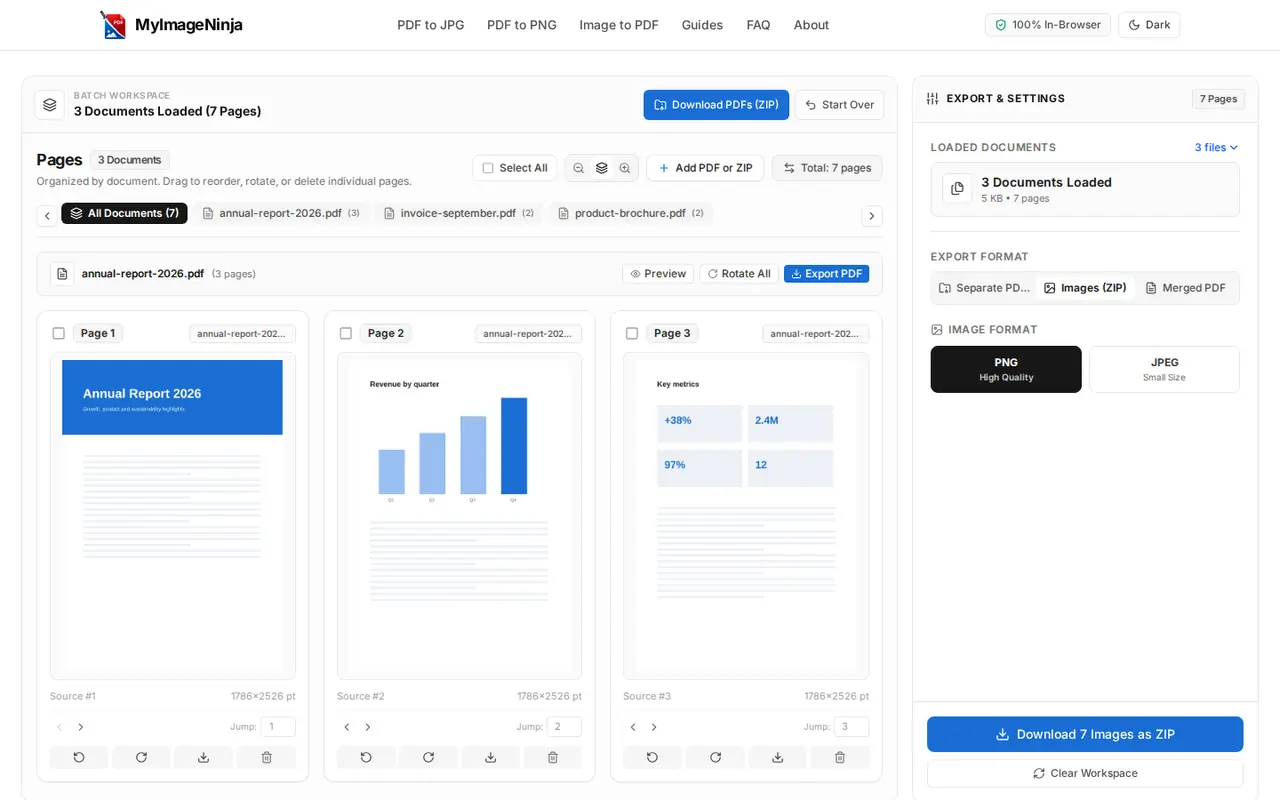
Every page appears as a thumbnail. Drag to reorder, rotate sideways scans and delete pages you don't need.
-
3
Choose JPG or PNG
Open Export & Settings → Images (ZIP) and pick PNG for sharp text or JPG for smaller files.
-
4
Download one ZIP
Click Download to save every page as a numbered image in a single ZIP file.
Convert PDF to JPG
JPG gives small files that open everywhere, which makes it the best choice for scanned pages, photos, email and social media. Pages are saved at about 90% JPG quality.
Open the PDF to JPG converterConvert PDF to PNG
PNG uses lossless compression, so text, tables, charts and diagrams stay crisp and won't degrade when you edit and re-save them. Files are larger than JPG.
Open the PDF to PNG converterConvert multiple PDFs at once
Select many PDFs or drop a ZIP. Each document's pages stay grouped and labelled, and the images are named by order, source file and original page number.
How batch conversion worksSupported formats
MyImageNinja reads PDFs and common image formats, and exports images or PDFs:
| You can add | You can download |
|---|---|
| PDF documents (one or many) | JPG images, one per page, in a ZIP |
| ZIP or CBZ archives containing PDFs and images, including sub-folders | PNG images, one per page, in a ZIP |
| Images: JPG/JPEG, PNG, WebP, GIF, BMP, SVG | A single merged PDF (A4, US Letter or original size) |
| Any mix of the above in one batch | Separate PDFs, one per original document, in a ZIP |
Why use our PDF to image converter?
Most free online converters upload your files to a server and restrict free use. Here is how MyImageNinja compares with a typical upload-based converter's free plan:
| Feature | MyImageNinja | Typical upload-based converter (free plan) |
|---|---|---|
| Files uploaded to a server | No, processed in your browser | Yes |
| Number of PDFs per batch | No fixed limit | Often capped (for example 20 files) |
| File size | No fixed limit | Often capped (commonly 50 to 100 MB) |
| Account or email required | No | Sometimes |
| Watermark | No | Sometimes |
| Reorder, rotate or delete pages first | Yes | Rarely |
| ZIP archive as input | Yes | Rarely |
| Waiting in a server queue | No | Sometimes, at busy times |
Visual page editor
Drag to reorder, jump a page to an exact position, select several pages, rotate or delete them before exporting.
Organised output
Images are numbered with leading zeros and include the source document name, so large batches stay in order.
Back to PDF when needed
Merge everything into one PDF or rebuild each document separately, with page size, margins and compression options.
Privacy and security
Upload-based converters copy your PDF to a remote server, process it there and send the result back, so your document (bank statements, contracts, IDs, exam papers) sits on someone else's computer at least for a while.
MyImageNinja loads its conversion engine into your browser and does all the work locally, using Mozilla's open-source PDF.js in a Web Worker. Your files are not uploaded, stored or logged by us, and you can confirm that yourself in your browser's developer tools. The page itself still loads ads and site assets over the internet like any website.
Read: Is it safe to convert PDFs online?- No server uploadsFiles are read from your disk by the browser.
- Nothing kept after you leavePage images live in memory until you clear the workspace or close the tab.
- No queuesSpeed depends on your device, not on a busy server.
When to convert PDF pages to images
Sharing on social media and chat apps. Instagram, WhatsApp and most messaging apps display images instantly, while PDFs have to be downloaded and opened first.
Presentations and documents. Insert a chart, table or page from a PDF report into PowerPoint, Google Slides, Word or Canva as an image.
Study material and worksheets. Turn chapters, notes and question papers into images for flashcards, annotation apps or classroom displays.
Websites and online stores. Publish brochures, menus, catalogues and certificates as images that load quickly and preview everywhere.
Archiving scanned documents. Split multi-page scans into individual images, fix sideways pages and keep them numbered.
Upload forms that only accept images. Job portals, visa and exam applications often want JPG or PNG files rather than PDFs.
Frequently asked questions
Is this PDF to image converter really free?
Yes. MyImageNinja is free to use with no sign-up, no watermarks and no daily limits. The website is supported by advertising.
How do I convert multiple PDFs to images at once?
Select all your PDF files at once (or drop a ZIP archive that contains them) on the converter above. When the pages appear, open Export & Settings, choose Images (ZIP) and pick JPG or PNG, then download. Every page of every PDF is saved as a separate image in one ZIP file.
How do I convert a PDF to JPG?
Open the PDF to JPG converter, add your PDF and click Export Images (ZIP). JPG is preselected on that page, and each page is saved as its own JPG file.
How do I convert a PDF to PNG?
Add your PDF to the converter on this page or on the PDF to PNG converter, keep PNG selected under Export & Settings → Images (ZIP), and download. You get one PNG image per page.
Can I convert every page of a PDF into a separate image?
Yes. Each page becomes its own image file, numbered in page order. If you only need some pages, delete the others before exporting, or use the download button on a single page's thumbnail.
Are my PDF files uploaded to a server?
No. Your files are opened and converted by your own web browser and are never sent to MyImageNinja or anyone else. That makes the tool suitable for confidential documents, as long as you use a device you trust.
Is there a limit on the number of PDFs or pages?
There is no fixed limit on files, pages or file size. Because the conversion happens on your device, the practical limit is your device's memory. Computers usually handle hundreds of pages comfortably; on phones, convert very large batches in smaller groups.
What resolution are the converted images?
Pages are rendered at up to twice their original size, about 144 DPI for standard pages. An A4 page becomes roughly 1190 × 1684 pixels, which is sharp on screens and fine for everyday printing. See how to get the best image quality for details.
Should I convert PDF to JPG or PNG?
Choose JPG for small files, scanned pages and photos. Choose PNG when pages are mostly text, charts or diagrams and you want the sharpest edges. Our JPG vs PNG guide compares them in detail.
Does it work on iPhone and Android?
Yes, in Safari, Chrome and other modern mobile browsers, with no app to install. See how to convert PDF to JPG on iPhone and Android.
Do I need to install any software?
No. The converter runs in any modern web browser on Windows, macOS, Linux, ChromeOS, Android and iOS.
Can I convert password-protected PDFs?
Encrypted PDFs need to be unlocked first. Open the file with its password in a PDF reader, save an unprotected copy you are authorised to make, then convert that copy.
More answers in the full FAQ, or contact us.
Related PDF tools
Guides and tutorials
All guidesHow to Convert Multiple PDFs to Images at Once
Batch-convert whole folders of PDFs and keep the output organised.
How to Convert PDF to JPG
Every method for Windows, macOS, Linux and the browser.
How to Convert PDF to PNG
Lossless page images for text, charts and diagrams.
PDF to Image Quality: Resolution and DPI Explained
How to keep converted pages sharp without huge files.